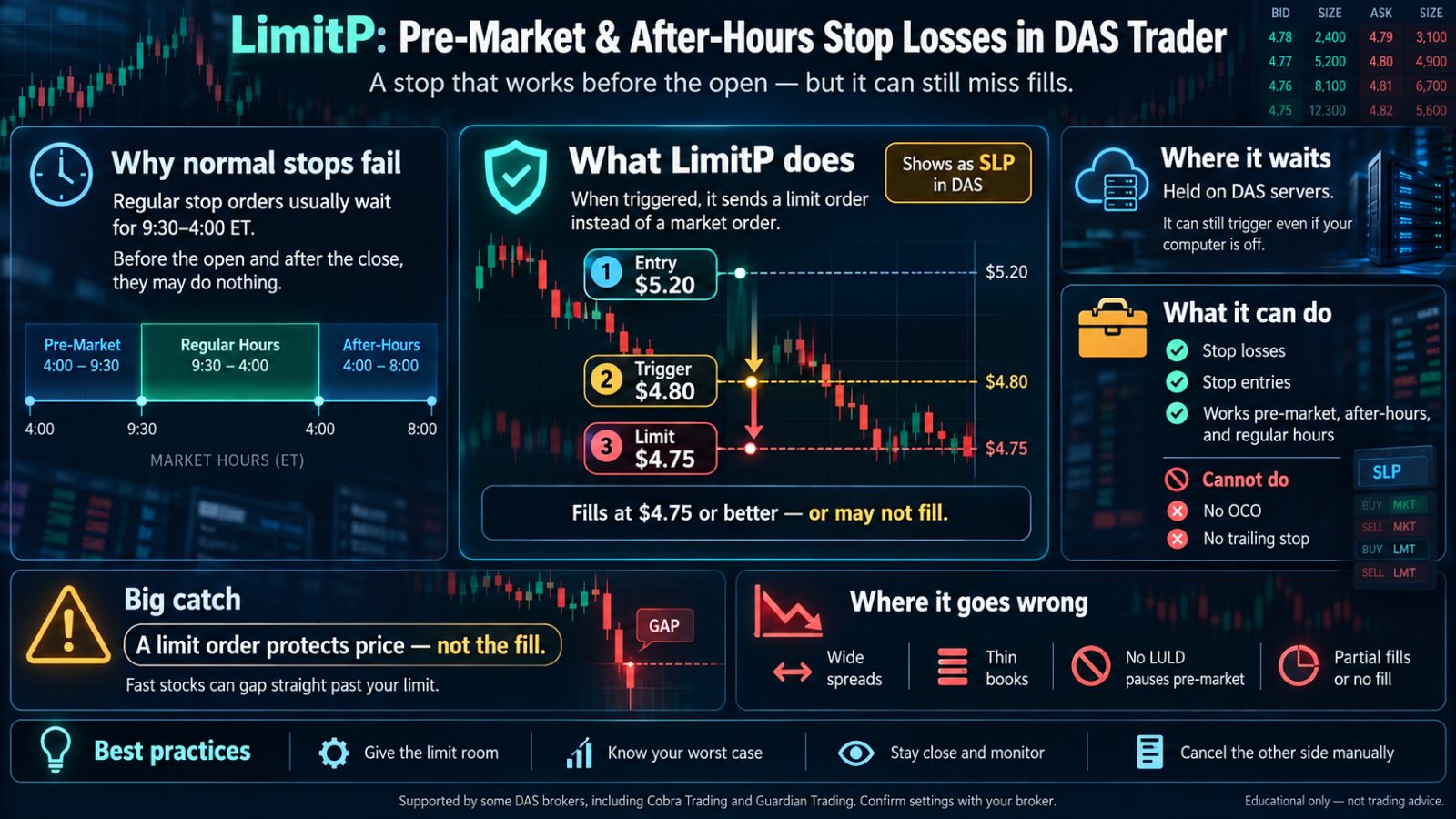
If you trade gappers, you know the problem. The stock is moving at 7:30 in the morning, you are in it, and your stop does nothing. At most brokers a stop order only works between 9:30 and 4:00 Eastern. Before the open and after the close, a regular stop just waits.
LimitP is the answer DAS Trader Pro offers. It is a stop type that works in pre-market and after-hours, and some brokers, including Cobra Trading and Guardian Trading, will switch it on for your account. For a newer trader, it means a stop that actually works before the open, instead of one that waits for 9:30.
It also has a catch every LimitP user needs to understand before trusting it on a thin, fast stock. This primer covers how LimitP works, how to get it, where it goes wrong, and how to use it well.
Why a Normal Stop Does Nothing Before 9:30
A standard stop order becomes a market order when it fires. Outside regular hours, brokers accept limit orders, not market orders, so a regular stop is held until the open.
That means the stop you placed at 7:45 to protect a pre-market position will not fire at 7:50 when the stock drops through it. It waits for 9:30, and by then the stock can open well below your level.
What LimitP Is
LimitP is a stop type in DAS Trader Pro. Instead of becoming a market order when it fires, it becomes a limit order, and limit orders are allowed in pre-market and after-hours. That one change is what lets it work outside regular hours. It works during regular hours too.
A LimitP stop has two prices:
- The trigger price: the level that sets the stop off.
- The limit price: the worst price you will accept once it fires.
For a long position, the trigger sits above the limit. Say you are long at $5.20 and your stop is $4.80. You might set the trigger at $4.80 and the limit at $4.75. When the stop triggers at $4.80, DAS sends a sell order with a limit of $4.75. It fills at $4.75 or better, or it does not fill. For a short position it is the mirror image: the trigger sits below the limit, and the stop buys back at the limit or better.
In the DAS orders window, a LimitP stop shows as SLP.
Where the Order Waits
A LimitP stop waits on DAS's servers, not on your computer. You can close DAS or shut your computer down and the stop still fires. That matters in pre-market, when many traders step away between the early move and the open.
What LimitP Can and Cannot Do
- Stop losses on an open position: YES.
- Stop entries, a buy above a level or a short below one: YES.
- Range OCO orders, a target and a stop linked so one cancels the other: NO.
- Automatic trailing stops: NO.
The missing OCO is the one that bites. If you place a profit target and a LimitP stop as two separate orders, nothing links them. When one fills, the other is still live. Cancel it yourself, every time.
Which Brokers Support LimitP
LimitP is a DAS feature, but your broker decides whether you get it. It stays off until the broker turns it on for your account.
- Cobra Trading offers it. You ask their support desk to enable it on your account.
- Guardian Trading documents it in its DAS hotkey guides, including full hotkey scripts.
Other DAS brokers may offer it too, and support changes over time. If yours is not listed here, ask.
How to Turn LimitP On
1. Open DAS and check the stop type list in your montage. If LimitP is already there, you have it.
2. If it is not, email your broker's support desk. Say you trade on DAS Trader Pro and ask them to enable the LimitP stop type on your account.
3. Ask them the three questions in the next section before you rely on it.
4. Once they confirm, check that LimitP appears in the stop type list.
5. Test it in the simulator first if your broker's simulator supports it, and confirm it shows as SLP in your orders window.
Three Questions to Ask Your Broker
- What does the trigger watch? Some stops fire on the last trade, others on the bid or the ask. In a thin pre-market book, one odd print or a flickering quote can set off a stop under one rule and not the other. Know which rule yours follows.
- When does it expire? Ask whether a LimitP stop placed in pre-market carries into the regular session and after-hours, or ends with the session it was placed in.
- What happens to a stop on shares you no longer hold? If your target fills and the stop is still live, ask what happens if that stop fires.
Where LimitP Goes Wrong
Here is the catch. Once a LimitP stop fires, it is a limit order.
A limit order protects your price. It does not promise a fill.
Picture a low float gapper at 8:10. You are long at $5.20, trigger $4.80, limit $4.75. A seller hits the stock and the bid drops from $4.95 to $4.40 in two seconds. Your stop fires at $4.80 and sends a sell at $4.75. Nobody is bidding $4.75 anymore. The order sits there unfilled while the stock keeps falling, and you are still long.
That is a gap-through, and it is most likely exactly when a pre-market stop matters most:
- Wide spreads. Pre-market spreads on small caps can be 20 or 30 cents or more. Your limit has to sit where buyers are actually paying.
- Thin books. A few hundred shares on the bid can disappear in one print.
- No pauses. The limit up / limit down pauses that slow a collapse during regular hours do not run before 9:30 or after 4:00.
- News. A filing or a headline in pre-market can move a stock a long way between two quotes.
A partial fill is the quieter version of the same problem. Some of your shares sell at your limit, the rest do not, and you are holding the rest while the price keeps falling.
Keys to Using LimitP Well
- Give the limit room.A limit one cent under the trigger rarely fills in a fast pre-market drop. Common hotkey setups put it about 0.5% away, and Guardian notes that fast movers and stocks under $1 need more room than that. Look at the spread before you set it.
- Know your worst case before you enter.The limit is the worst price you accept. A gap-through is the price you might actually get. If you could not live with the stock trading below your limit, that is a decision about the entry, not the stop.
- Stay close.LimitP lets you step away, but a stop that fired and did not fill needs you. From that moment you are managing the position by hand.
- Check the orders window.After you place it, confirm the stop shows as SLP with the prices you meant.
- Mind the decimals under $1.Stocks under a dollar can be quoted to four decimal places. Check what your broker accepts before you set a limit like $0.4875.
- Cancel the other side.With no OCO, a filled target leaves a live stop, and a filled stop leaves a live target.
LimitP Questions Traders Ask
**Does LimitP work after hours?** Yes. It works in pre-market, after-hours and during regular hours.
**Is LimitP the same as a stop limit order?** It has the same two prices, a trigger and a limit. The difference is that a LimitP stop works outside regular hours, where an ordinary stop limit order usually does not, and it waits on DAS's servers until it fires.
**Will my LimitP stop fire if my computer is off?** Yes. It waits at DAS, so your computer does not need to be on.
**Can a LimitP stop fail?** It can fail to fill. If the price moves past your limit before your order fills, the order stays open and you stay in the trade.
**Can I use LimitP for OCO orders or trailing stops?** No. It works for stop losses and stop entries.
**What does SLP mean in DAS?** It is how a LimitP stop is labeled in the orders window.
**Which brokers offer LimitP?**Cobra Trading and Guardian Trading are two. Ask your broker to enable it on your account.
Where This Fits
A pre-market stop is a decision you make before the move, not during it. MAKETZO works the same way: you set the rules for your day before the open, and the app holds you to them when the stock is moving fast. LimitP handles the order. Making the decision ahead of time is still your job.
This article is education, not trading advice. Order types and broker features change, so confirm every detail with your broker before you rely on it.